rtl_433 Your Key to the Invisible World of Radio Waves
How many wireless devices surround us every day? Temperature sensors, humidity sensors, tire pressure sensors, gate remote controls, weather stations... They all communicate via radio, but their "language" is usually closed to us. What if we could understand it? What if an ordinary USB dongle could become your personal translator from the "language" of radio waves?
What Is This Thing and Why Do You Need It?
Allow me to introduce rtl_433 – a project that does exactly this. It's a universal data receiver capable of decoding signals from popular ISM bands (433.92 MHz, 868 MHz, 315 MHz, 345 MHz, and 915 MHz). Essentially, rtl_433 is a bridge between your inexpensive SDR receiver (for example, based on the RTL2832 chip) and the world of wireless sensors that quietly "whisper" in the air. Why would a developer need this? For home automation, for security analysis, for building your own monitoring systems, for curiosity, finally!
How Does It Work? The Magic of SDR and rtl_433
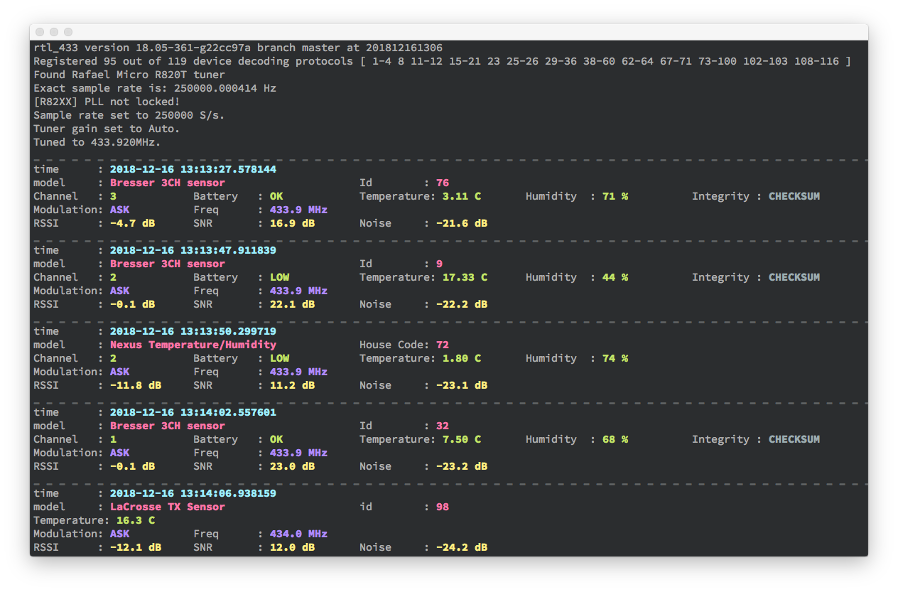
At the core of rtl_433 lies the concept of Software Defined Radio (SDR). You connect a special USB receiver to your computer (for example, RTL-SDR or more advanced LimeSDR, HackRF One), and rtl_433 takes care of all the complex work of demodulating and decoding radio signals. It knows the "languages" of hundreds of different devices, turning chaotic radio noise into structured, understandable data.
Key Features: Your Personal Radio Decoder
rtl_433 is not just a "listener" – it's a full-featured tool with an impressive set of capabilities:
1. Support for Hundreds of Devices
The list of supported protocols is simply amazing! From simple temperature and humidity sensors (LaCrosse, Acurite, TFA) to weather stations (Fine Offset), tire pressure sensors (TPMS from Toyota, Ford, Hyundai), gate remote controls, water leak sensors, and even some security systems. If you have a wireless sensor, there's a good chance that rtl_433 already knows how to understand it. And, importantly, the list is constantly growing thanks to the community.
2. Flexible Decoding Configuration (Flex Decoder)
What if your device isn't on the list? No problem! Using the "Flex decoder" function (-X <spec>), you can describe the signal protocol yourself. Specify the modulation (OOK_PWM, FSK_PCM, etc.), pulse durations, synchronization sequences, and other parameters. This opens the door to exploring new or proprietary protocols and allows you to become a true expert in radio communications.
rtl_433 -X "n=doorbell,m=OOK_PWM,s=400,l=800,r=7000,g=1000,match={24}0xa9878c,repeats>=3"
This example shows how you can add support for a hypothetical wireless doorbell by describing its protocol.
3. Diverse Output Formats and Integration
The received data can be output in a format convenient for you: plain log, key-value (kv), JSON, CSV. But the most interesting part is the integration capabilities! rtl_433 can send data directly to an MQTT broker (perfect for Home Assistant and other smart home systems), InfluxDB for time series storage, Syslog, or even provide its own HTTP API. This makes it easy to embed wireless sensor data into any automated system of yours.
rtl_433 -F json -M utc | mosquitto_pub -t home/rtl_433 -l
This example demonstrates how easy it is to integrate wireless sensor data into your smart home system via MQTT, receiving it in JSON format with precise timestamps.
4. Real-Time Signal Analysis
Pulse Analyzer mode (-A) lets you see the "raw" signal data – pulse durations, pauses, their sequences. This is an invaluable tool for reverse engineering new protocols, debugging existing ones, or simply for a deep understanding of how radio communication works at the low level.
Installation and Startup: Easier Than It Seems
The project is written in portable C (C99), which ensures it works on a wide range of systems: Linux (including embedded), macOS, and Windows. Installation usually doesn't cause any problems:
- On Debian/Ubuntu:
sudo apt-get install rtl-433 - On macOS:
brew install rtl_433 - Docker images are also available for those who prefer containerization.
After installation, simply run rtl_433, and it will start listening on the 433.92 MHz frequency by default. Want a different frequency? No problem:
rtl_433 -f 868M -s 1024k
This command will make rtl_433 listen at 868 MHz with a sample rate of 1024 kHz.
Real-Life Examples: Where Will rtl_433 Come in Handy?
- DIY Smart Home: Connect temperature and humidity sensors from outdoors or from the refrigerator, water leak sensors, without the need to buy expensive proprietary hubs. All data will be available in your automation system (for example, Home Assistant) via MQTT or HTTP API.
- Vehicle Monitoring: Monitor tire pressure directly from your computer using the stock TPMS sensors. This can be useful for diagnostics or just for curiosity.
- Energy Monitoring: Some electricity or water meters transmit data via radio. rtl_433 can help read them and integrate them into a consumption tracking system.
- Security and Reverse Engineering: Analyzing signals from wireless security system sensors (for example, DSC, SimpliSafe) can be of interest to security researchers and enthusiasts.
- Education and Hobby: A great way to dive into the world of radio electronics, understand how wireless protocols work, and learn to decode them. This is a real "sandbox" for experimentation.
An Important Note: About Security
The developers honestly warn: data received "from the air" should not be considered absolutely reliable. The project is not intended for use in critical systems without additional verification. And of course, you shouldn't run it with sudo privileges, as this can create unnecessary risks. Always remember that you're working with the radio spectrum, which can be unpredictable.
Conclusions: Is It Worth Diving into the World of Radio Waves?
rtl_433 is not just a utility – it's an entire ecosystem for interacting with the wireless world around us. If you've ever wondered what's "flying" in the air, or wanted to integrate cheap wireless sensors into your smart home without extra complications, then rtl_433 is your ideal helper. It opens doors for experimentation, research, and creating truly custom solutions. Give it a try, and you'll be amazed at how much interesting stuff you can "hear" with an ordinary SDR dongle! This is an exciting journey into a world that was previously hidden from our eyes.
Related projects