How to Make an AI Agent Work with a Massive Legacy Codebase Without Losing Context or Money
Sound familiar? You ask Claude or ChatGPT to figure out the logic of an old project, and it starts "hallucinating" or just burns through its entire token limit trying to read hundreds of files with plain grep. Even modern agents like Claude Code often behave like blind kittens when it comes to deep connections between services or complex call chains.
The other day I stumbled upon the codebase-emory-mcp repository. It's an MCP (Model Context Protocol) server that transforms your code into a structured knowledge graph. Instead of feeding raw text to the neural network, the tool builds a map of functions, classes, and dependencies that AI can understand with half a word.
What's Wrong with Regular Search
When an AI agent tries to understand your code, it usually does it the brute-force way. It runs string searches, opens files one by one, and tries to keep it all in its head. The problem is that the context window isn't infinite. If the project is large, the agent quickly forgets the beginning of the call chain or starts confusing similar methods in different modules.
The DeusData developers claim impressive numbers: using their graph reduces token consumption by 120 times. Where a regular agent needs to process 400,000 tokens, this tool only needs three to four thousand. This isn't just about saving money on API calls—it's primarily about answer accuracy.
What This Engine Can Do
The project is written in "pure" C and uses SQLite for data storage. This gives insane speed. Indexing the Linux kernel (that's 28 million lines of code) takes only three minutes. A typical Django or React project gets "swallowed" in a couple of seconds.
Here are a few things that caught my attention:
- Architecture understanding. The tool sees not just text, but structure. It distinguishes API endpoints, understands which function calls which, and even finds "dead" code that nobody uses.
- Support for 66 languages. Thanks to tree-sitter, the engine understands almost everything—from Python and TypeScript to Rust and COBOL. Moreover, for C, C++, and Go it can infer types in LSP style.
- Visualization. It comes with an (optional) 3D graph visualizer. You can literally spin your project around in the browser at
localhost:9749and see how the modules are connected. - Agent integration. With one command
installthe utility configures itself for Claude Code, Zed, Aider, and a dozen other popular tools.
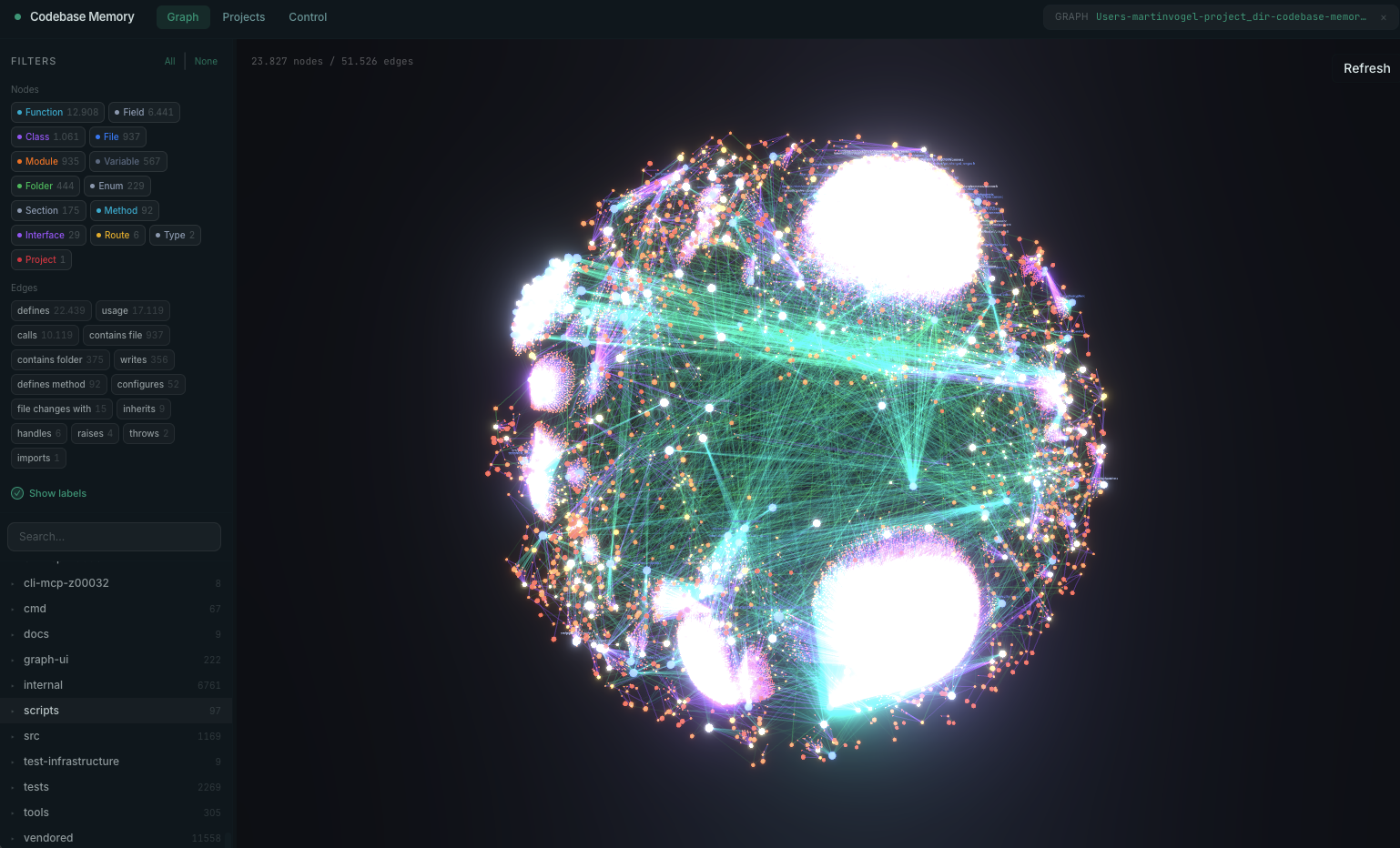
That very 3D graph you can spin around in the browser
How It Works Under the Hood
Interestingly, the authors decided not to embed their own LLM inside to translate queries into database commands. They reasoned wisely: since you're already talking to a smart agent (like Claude 3.5 Sonnet), let it handle the translation.
You ask: "Who calls the method ProcessOrder?". The agent understands the intent and calls the tool trace_call_path. The engine traverses the graph in milliseconds and returns a structured response. As a result, the AI sees a clear chain instead of trying to guess it from indirect clues.
SQLite in WAL mode is used for storage, and data is compressed with the LZ4 algorithm. This allows keeping the index of even very large projects directly in memory during operation without stressing the disk.
Practical Benefits for Developers
The most obvious use case is onboarding to a new project or refactoring an old one. Instead of manually building diagrams in your head, you give the agent access to codebase-memory-mcp.
For example, you can ask: "Find all endpoints that accept UserID but don't check access rights". The tool will find the connections between HTTP routes and validation methods that regular text search would miss.
Another cool feature is detect_changes. It analyzes your current git diff and shows the "blast radius": which functions and modules your changes will affect. This is great insurance before committing.
How to Try It
Installation is as simple as it gets—no Docker or extra dependencies. For macOS and Linux, just one terminal command:
curl -fsSL https://raw.githubusercontent.com/DeusData/codebase-memory-mcp/main/install.sh | bash
If you want visualization right away, add the flag --ui. After installation, just restart your AI agent and tell it: "Index this project".
Is It Worth It
The project looks very promising. What I especially like is that it's not another cloud service, but a local utility. All your code stays on your machine—no data gets sent to external servers for indexing.
Of course, there are nuances. The analysis quality for some languages like Haskell is still lower than for mainstream Python or Go. But the list of supported technologies and the processing speed more than make up for these rough edges.
If you actively use AI in your daily development and feel like it's starting to "stall" on complex tasks, this tool could be that missing link. At the very least, the ability to see your project as a 3D graph is definitely worth ten minutes of installation time.
Related projects